ArthurCare
  • Home
  • Programs
  • Find MSK Care
  • MSK Care A to Z
    • MSK Pain By Location
      • Your trusted guide to MSK joint & spine pain
    • MSK Conditions A to Z
      • Your complete guide to MSK joint & spine conditions
    • MSK CareInsights
      • Your source for MSK health insights
    • MSK CareLists
      • Quick reads packed with actionable advice
  • New Referral
  • About ArthurCare
  • Click to open the search input field Click to open the search input field Search
  • Menu Menu
ArthurCare MSK Care Insights
MSK Care Insights

Ergonomic Essentials: Creating a Workspace that Supports Your Body
Ergonomic Essentials: Creating a Workspace that Supports Your Body

Have you ever ⁣finished a long day at⁤ work⁢ only to be‍ met ‍with a stiff neck, aching back, or sore⁢ wrists?‌ You’re ⁤not⁢ alone. Many people experience discomfort from their workspaces, especially if⁤ they spend hours sitting at ⁣a desk. The good news is that you can ​take ​control and prevent these aches and pains ⁤with a few simple changes. ⁤This‍ is where ergonomics comes in.

Ergonomics is all⁢ about designing your workspace ⁤to fit your body ​and how you work. By making‌ a few adjustments, you can reduce stress on your muscles, tendons, and ⁣joints, leading to a healthier and more⁣ comfortable you.

Setting Up Your Workstation for Success

Let’s break down how to create an ergonomic workspace that supports your body from head to ⁢toe:

1. Chair:

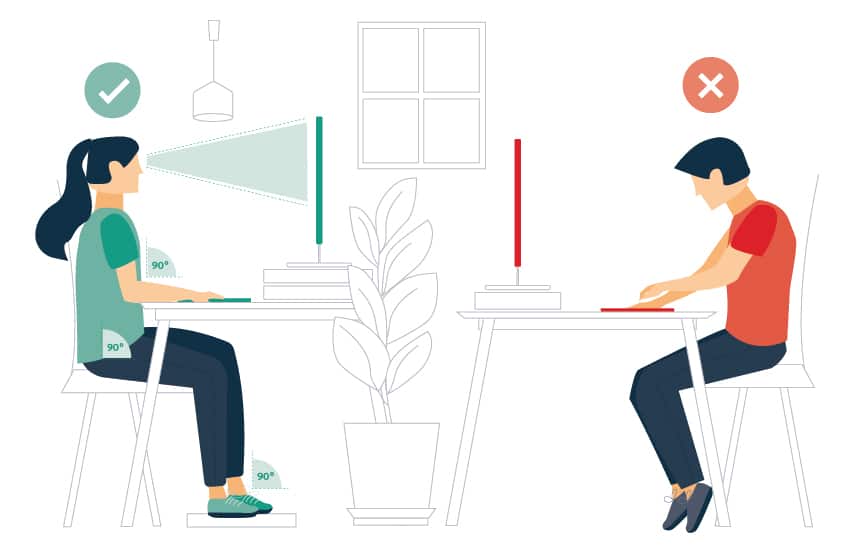
Adjustability is ​Key: ⁤ Choose a chair that allows you to‌ adjust the height so your feet are flat on the floor ⁤and your knees are⁢ at a ​90-degree angle.
Lumbar Support: Make sure your ⁢chair provides good⁤ lower back support. If needed, use a rolled-up towel or a lumbar‌ pillow⁣ to fill the gap between ⁤your lower ⁢back‌ and the chair.
Armrests: Adjust ⁤armrests so your elbows are bent at a 90-degree angle and your‍ shoulders are relaxed.

2. Desk:

Find the Right Height: Your desk should be at a height that allows your elbows ⁤to bend ⁢at a 90-degree angle while typing. If your desk is too high, consider using a keyboard‍ tray.
Clear the Clutter: ‍ Keep frequently used items within easy reach to avoid ⁢unnecessary stretching and‍ reaching.

3. Computer Setup:

Monitor Placement: ⁢ Position your monitor directly in front of you, about an arm’s length away. The ‌top of the screen should be at or slightly below eye level.
Keyboard and Mouse: Place⁣ your keyboard⁣ and mouse directly⁢ in front⁢ of you, close enough to avoid reaching. Use a keyboard wrist rest if needed.
Take​ Breaks ⁤from Typing: Every 20-30 minutes, take a break ‍from ⁤typing to stretch your hands‍ and wrists.

4. Posture Perfect:

Sit Up Straight: Maintain good ⁣posture by sitting up straight ⁢with your shoulders relaxed and your head ​level. Avoid slouching or hunching⁣ over your keyboard.
Take Standing ⁤Breaks: If possible,‍ stand up and move around for a few minutes every hour to reduce‌ pressure on your ⁢spine and improve circulation.

5.‌ Lighting is Everything:

Natural Light‌ is Best: ​Position your workstation near ⁤a window to take advantage of natural light.
Reduce Glare: Adjust blinds or curtains to minimize glare on your computer screen.
Use ‌Task Lighting: If​ needed, use a desk‍ lamp to provide‍ additional​ light for reading and writing.

Small ⁣Changes, Big Impact

Creating an ergonomic workspace doesn’t have to be complicated⁢ or expensive. Even ‌small‌ changes ⁢can make ​a big difference in preventing musculoskeletal pain and improving ⁤your ⁤overall well-being. By following these tips, you can create a workspace that ⁤supports your body⁤ and helps you stay healthy and comfortable throughout ‍your workday.

For more information on ergonomics and workplace health, ‌visit the following resources:

The Occupational ⁣Safety and Health Administration (OSHA): [OSHA Website Link]

The National Institute for Occupational ​Safety and Health (NIOSH): [NIOSH Website Link]
25 August 2024/by Arthur Learn
Tags: body support, employee well-being, ergonomic accessories, ergonomic furniture, ergonomics, health and wellness, health tips, home office, office setup, posture, productivity, remote work, work environment, workplace comfort, workspace design
Share this entry
  • Share on Facebook
  • Share on X
  • Share on LinkedIn
  • Share by Mail
https://www.arthurcare.com/wp-content/uploads/2024/08/4432-ergonomic-essentials-creating-a-workspace-that-supports-your-body.jpg 550 851 Arthur Learn https://www.arthurcare.com/wp-content/uploads/2021/01/arthurcare_logo.png Arthur Learn2024-08-25 23:55:502024-08-25 23:59:44Ergonomic Essentials: Creating a Workspace that Supports Your Body
You might also like
5 Dietary Tweaks to Tame Gout Flare-Ups Effectively 5 Dietary Tweaks to Tame Gout Flare-Ups Effectively
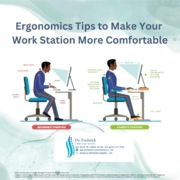
5 Ergonomic Tips to Combat Back Pain in the Workplace 5 Ergonomic Tips to Combat Back Pain in the Workplace
Building Bone Strength: Tips for Preventing Osteoporosis Building Bone Strength: Tips for Preventing Osteoporosis
5 Essential Insights for Understanding Scoliosis Care 5 Essential Insights for Understanding Scoliosis Care
5 Empowering Strategies to Manage Fibromyalgia Pain 5 Empowering Strategies to Manage Fibromyalgia Pain
Children and MSK Pain: Growing Up Strong and Healthy Children and MSK Pain: Growing Up Strong and Healthy

LATEST ANNOUNCEMENTS

FIND A CLINIC NEAR YOU & GET EXPERT MSK CARE TODAY

Tags

Aging arthritis back pain chronic pain ergonomics exercise fitness fitness tips health and wellness health awareness healthcare health education health tips holistic health inflammation injury prevention joint health lifestyle lifestyle changes medical advice mental health mind-body connection mindfulness Mobility MSK health MSK Pain musculoskeletal disorders musculoskeletal health nutrition pain management pain relief patient care patient education Physical Activity physical health physical therapy posture rehabilitation self-care spine health Strength Training treatment options wellness wellness strategies Wellness Tips

About Arthur Health

Arthur Health is a healthcare solutions company on a mission to revolutionize the way musculoskeletal (MSK) pain is managed. We believe that everyone deserves access to timely, effective, and personalized care, regardless of their location or circumstance. Learn more about Arthur Health.

Latest MSK CARE ARTICLES

  • Gardening for MSK Wellness: Nurturing Your Body and Your Garden
    Gardening for MSK Wellness: Nurturing Your Body and Your Garden30 April 2025 - 1:57 amin: MSK Care Insights
  • Hiking for Happy Joints: Embracing Nature’s Remedy
    Hiking for Happy Joints: Embracing Nature’s Remedy27 April 2025 - 1:57 amin: MSK Care Insights
  • Osteoporosis: The Silent Thief of Bone Health
    Osteoporosis: The Silent Thief of Bone Health24 April 2025 - 1:57 amin: MSK Care Insights

Site Map

  • Home
  • Programs
  • Find MSK Care
    • Dashboard
  • MSK Care A to Z
    • MSK Pain By Location
    • MSK Conditions A to Z
    • MSK CareInsights
    • MSK CareLists
  • New Referral
  • About ArthurCare
© Copyright 2022-2024 - Arthur Health - Excellent Health Care For All. Privacy Policy
  • Link to X
  • Link to Instagram
  • Link to LinkedIn
  • Programs For Patients & Injured People
  • Programs for Practitioners
  • Programs For Accident Injury
  • Programs For Work Injury
Link to: 7 Key Benefits of Physical Therapy for MSK Health Link to: 7 Key Benefits of Physical Therapy for MSK Health 7 Key Benefits of Physical Therapy for MSK Health7 Key Benefits of Physical Therapy for MSK Health Link to: 7 Simple Ways to Enhance Your MSK Health at Home Link to: 7 Simple Ways to Enhance Your MSK Health at Home 7 Simple Ways to Enhance Your MSK Health at Home7 Simple Ways to Enhance Your MSK Health at Home
Scroll to top Scroll to top Scroll to top