
5 Ergonomic Tips to Combat Back Pain in the Workplace
In today’s fast-paced work environment, many of us find ourselves glued to our desks for hours on end, often sacrificing comfort for productivity. Unfortunately, this sedentary lifestyle can lead to nagging back pain that disrupts our focus and diminishes our overall well-being. But fear not! We’ve compiled a list of 5 ergonomic tips designed to help you combat back pain right in your workplace. From simple adjustments to your chair and desk setup to mindful habits that promote better posture, these practical strategies will empower you to create a healthier work environment. Read on to discover how you can enhance your comfort, boost your productivity, and reclaim your day from the clutches of back discomfort.
1) Invest in an ergonomic chair: A chair that supports your lower back and encourages good posture can make a world of difference. Look for adjustable features that allow you to customize the height, seat depth, and lumbar support to fit your body perfectly
Choosing the right chair is crucial for anyone who spends long hours at a desk. An ergonomic chair is designed to provide essential support for your lower back, helping to maintain the natural curve of your spine. Look for features such as adjustable height, seat depth, and lumbar support to ensure that the chair fits your unique body shape. A chair that can be customized not only enhances comfort but also promotes better posture, reducing the strain on your back muscles and discs.
When selecting an ergonomic chair, consider the following features to maximize your comfort:
- Adjustable Armrests: To reduce shoulder strain, ensure the armrests can be adjusted to a height that allows your arms to rest comfortably.
- Seat Material: Look for breathable fabric or mesh to keep you cool and comfortable throughout the day.
- Swivel Base: A chair that swivels allows you to reach different areas of your workspace without twisting your back.
Investing in a quality ergonomic chair is not just a purchase; it’s an investment in your health and productivity. By creating a workspace that supports your body, you can significantly reduce the risk of back pain and enhance your overall work experience.
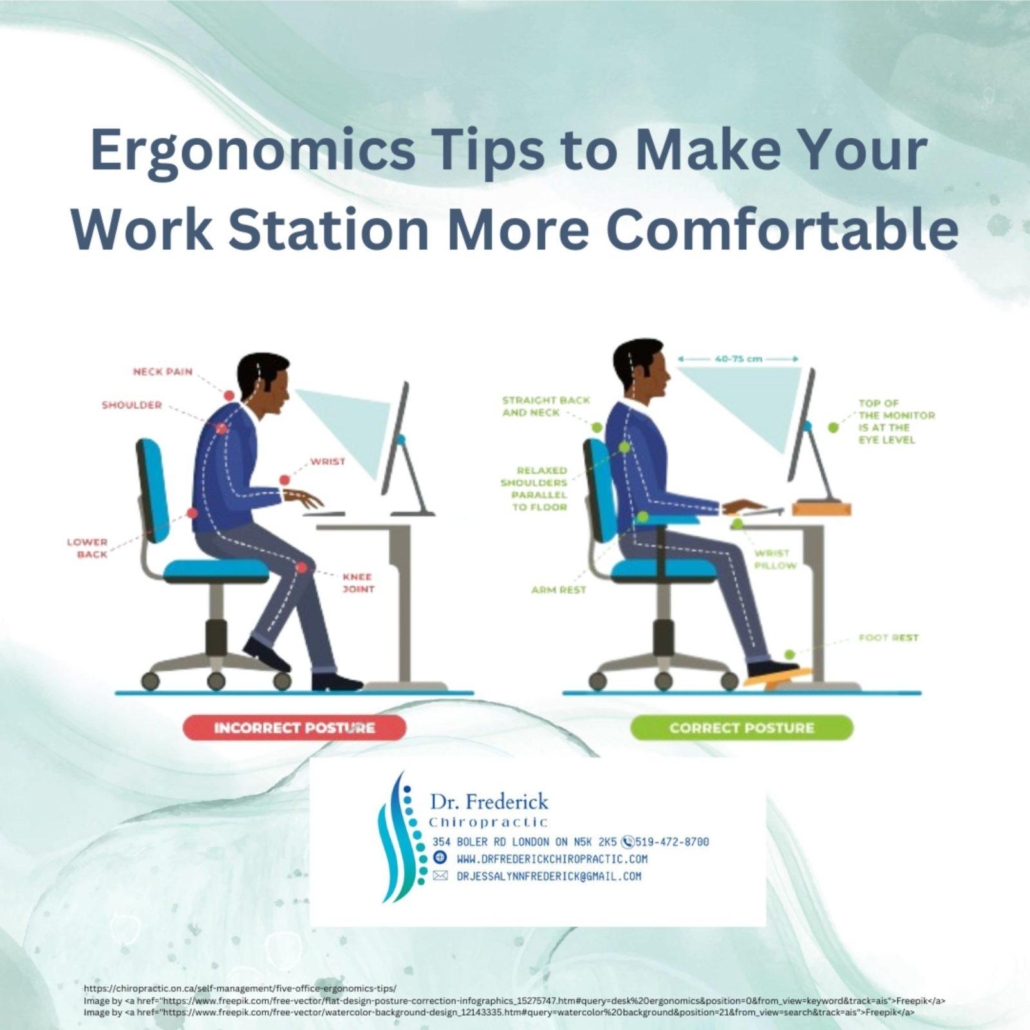
2) Set up your workstation correctly: Position your computer screen at eye level and keep your keyboard and mouse within easy reach. This setup minimizes strain on your neck and shoulders, allowing you to maintain a more relaxed posture throughout the day
Creating an ergonomic workspace is essential for reducing discomfort and enhancing productivity. Begin by positioning your computer screen at eye level; this ensures that your neck remains in a neutral position, minimizing strain and fatigue. You can achieve this by using a monitor stand or adjusting the height of your chair. Make sure the screen is about an arm’s length away, so you can easily read the text without leaning forward or squinting. Additionally, consider the angle of your screen—tilting it slightly backward can help reduce glare and improve visibility.
Next, focus on the placement of your keyboard and mouse. They should be positioned within easy reach, allowing your arms to rest comfortably at your sides. Your elbows should be at a 90-degree angle or slightly obtuse, which helps keep your shoulders relaxed. To further enhance your setup, you might want to invest in an ergonomic keyboard and mouse that promote a natural hand position. Remember to take regular breaks to stretch and adjust your posture throughout the day, ensuring that your workspace remains a haven for comfort and efficiency.
3) Take regular breaks to stretch: Schedule short breaks every hour to stand up, stretch, and walk around. Simple stretches can alleviate tension in your back and improve circulation, helping to prevent stiffness and discomfort as you work
Incorporating regular breaks into your work routine is essential for maintaining both physical and mental well-being. Setting a timer to remind yourself to stand up and move every hour can make a significant difference in how you feel throughout the day. During these breaks, aim to perform simple stretches that target areas prone to tension, such as the neck, shoulders, and lower back. Here are some effective stretches to consider:
- Neck Stretch: Gently tilt your head to one side, holding for 15-30 seconds, then switch sides.
- Shoulder Roll: Roll your shoulders forward and backward in a circular motion for 10 repetitions each.
- Seated Torso Twist: While seated, place your right hand on the back of your chair and twist your torso to the right. Hold for 15-30 seconds, then switch sides.
- Standing Hamstring Stretch: Stand up, place one foot on a low chair or desk, and lean forward gently to stretch the back of your leg.
In addition to stretching, taking a brief walk around your workspace can enhance circulation and invigorate your mind. This movement helps to break the monotony of sitting and allows your muscles to relax. Consider creating a schedule that includes a mix of stretches and walking to keep your body engaged. You might even find it helpful to keep a list of stretches visible at your workstation, serving as a friendly reminder to prioritize your physical health. Here’s a simple table to help you track your breaks:
| Time | Activity |
|---|---|
| 10:00 AM | Stretch |
| 11:00 AM | Walk |
| 12:00 PM | Stretch |
| 1:00 PM | Walk |
| 2:00 PM | Stretch |
| 3:00 PM | Walk |
4) Practice proper lifting techniques: If your job involves lifting objects, always bend at the knees and keep your back straight. Use your legs to lift rather than your back, and avoid twisting your torso while carrying heavy items to reduce the risk of injury
When it comes to lifting objects in the workplace, your technique can make all the difference in preventing back pain. Start by positioning yourself close to the object you intend to lift. This minimizes the strain on your back and allows you to use your leg muscles effectively. Remember to bend at the knees and maintain a straight back throughout the lift. By engaging your legs, you harness their strength to do the heavy lifting, rather than relying on your back, which is more prone to injury.
Additionally, it’s crucial to avoid twisting your torso while carrying heavy items. Instead, pivot your feet to change direction, keeping your body aligned. This simple adjustment helps maintain proper posture and reduces the risk of strain on your spine. Consider the following tips to enhance your lifting technique:
- Plan Your Lift: Assess the weight and size of the object before lifting.
- Get Help: For particularly heavy or awkward items, don’t hesitate to ask for assistance.
- Use Equipment: Utilize carts or dollies whenever possible to reduce physical strain.
5) Stay mindful of your posture: Make a conscious effort to sit up straight and avoid slouching. Consider using reminders, like sticky notes or apps, to help you maintain good posture throughout the day, keeping your spine aligned and reducing strain on your back
Maintaining proper posture is essential for a healthy back, especially when you’re seated for long periods. Make it a habit to check in with your body throughout the day. Sit up straight, with your shoulders relaxed and your back against the chair. A good way to reinforce this habit is by setting up visual reminders around your workspace. Consider using sticky notes with motivational phrases like “Posture Check!” or “Sit Tall!” placed on your monitor or desk. Additionally, there are numerous apps available designed to send you gentle nudges throughout the day, encouraging you to adjust your posture and take breaks when needed.
To further enhance your posture, consider the ergonomics of your workspace. Adjust your chair height so that your feet rest flat on the ground, and your knees are at a 90-degree angle. Your computer screen should be at eye level to prevent you from leaning forward or looking down, which can lead to slouching. You can also create a simple posture checklist to follow during your workday:
| Posture Checklist |
|---|
| Feet flat on the ground |
| Knees at a 90-degree angle |
| Back against the chair |
| Shoulders relaxed |
| Screen at eye level |
| Take breaks every hour |
Wrapping Up
As we wrap up our exploration of ergonomic tips to combat back pain in the workplace, it’s clear that small adjustments can lead to significant improvements in your comfort and well-being. By implementing these five strategies, you can create a healthier work environment that not only boosts productivity but also enhances your overall quality of life. Remember, your body is your most valuable asset, and investing in its health pays dividends in both the short and long term. So, take a moment to assess your workspace, make the necessary changes, and prioritize your posture. Your back will thank you! Here’s to a more comfortable, pain-free workday ahead!







Leave a Reply
Want to join the discussion?Feel free to contribute!