
5 Ergonomic Tips to Revamp Your Workspace and Prevent MSK Injuries
In today’s fast-paced world, where many of us spend countless hours at our desks, the importance of a well-designed workspace cannot be overstated. Poor ergonomics can lead to a range of musculoskeletal (MSK) injuries, resulting in discomfort and decreased productivity. But fear not! Revamping your workspace doesn’t have to be a daunting task.In this listicle,we’ll explore 5 ergonomic tips that can transform your habitat into a haven of comfort and efficiency. From simple adjustments to your chair and desk setup to incorporating movement into your daily routine, you’ll discover practical strategies to enhance your workspace and safeguard your well-being.Get ready to take the first step towards a healthier, more productive you!
1) Invest in an Adjustable Chair: A chair that supports your lower back and allows for height adjustments can make a world of difference.Look for one with lumbar support, adjustable armrests, and a seat that promotes good posture, helping to reduce strain on your spine during long hours of work
Investing in an adjustable chair is one of the most effective ways to enhance your workspace ergonomics. A well-designed chair can significantly alleviate discomfort and prevent musculoskeletal (MSK) injuries. look for features that cater to your specific needs, such as lumbar support that cradles your lower back, which is crucial for maintaining spinal alignment. Additionally, adjustable armrests can definitely help reduce shoulder strain, allowing your arms to rest comfortably while typing or using a mouse. A seat designed to promote good posture not only enhances comfort but also encourages productivity, keeping you focused on your tasks rather of fidgeting to find a pleasant position.
when selecting the perfect chair, consider the following aspects to ensure it meets your ergonomic needs:
- Height Adjustment: Ensure the chair can be easily adjusted to fit your desk height.
- Seat depth: A seat that allows you to sit back while keeping your feet flat on the floor is ideal.
- Material: choose breathable fabrics that provide comfort for long hours of sitting.
- Swivel Base: A chair that swivels can reduce strain from reaching for items around your workspace.
| Feature | Benefit |
|---|---|
| Lumbar Support | Reduces lower back strain |
| adjustable Armrests | Minimizes shoulder discomfort |
| Seat Height Adjustment | Promotes proper desk alignment |
| Breathable Material | Keeps you cool and comfortable |
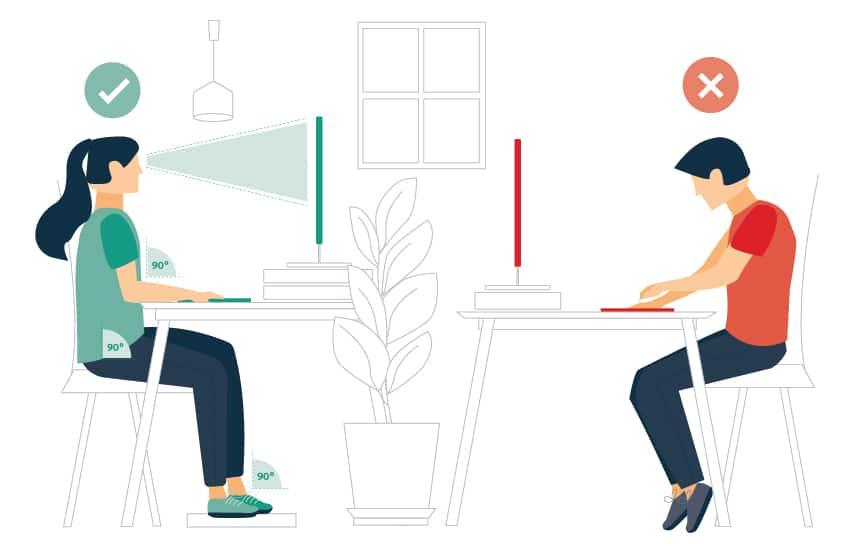
2) Optimize Your Desk Setup: Position your computer monitor at eye level and about an arms length away to prevent neck strain. Ensure your keyboard and mouse are at a height that keeps your elbows at a 90-degree angle, allowing for a more comfortable typing experience and reducing the risk of repetitive strain injuries
Creating an ergonomic workspace begins with the proper positioning of your computer setup. To minimize neck strain, make sure your monitor is at eye level. This means the top of the screen should align with your eyes when you’re seated comfortably. Additionally, position the monitor about an arm’s length away—typically between 20 to 30 inches. This distance helps reduce eye fatigue and keeps your posture aligned. Consider using a monitor stand or an adjustable arm to achieve this ideal height and distance, allowing for a more flexible workspace.
Your keyboard and mouse placement also plays a crucial role in your overall comfort. Ensure that both devices are set at a height that allows your elbows to remain at a 90-degree angle. this alignment not only promotes a more natural wrist position but also helps prevent repetitive strain injuries associated with prolonged typing. To further enhance your setup, think about using a wrist rest or an ergonomic keyboard that encourages a more relaxed hand position.Remember, small adjustments can lead to meaningful improvements in your comfort and productivity.
3) Incorporate Movement Breaks: Schedule short breaks every hour to stand, stretch, or walk around. Simple movements, like shoulder rolls or wrist stretches, can alleviate tension and improve circulation, helping to combat the physical toll of prolonged sitting and keep your mind sharp
Incorporating movement breaks into your daily routine can work wonders for both your physical and mental well-being. aim to schedule short breaks every hour, allowing yourself a few minutes to stand up, stretch, or take a swift walk around your workspace. These breaks can be as simple as performing shoulder rolls, neck stretches, or wrist flexes to release built-up tension. not only do these movements help alleviate discomfort, but they also promote better circulation, ensuring that your body remains energized and alert throughout the day.
To make the most of your movement breaks, consider setting a timer or using a productivity app that reminds you to pause and move. Here’s a quick list of effective stretches and movements to incorporate during your breaks:
- Shoulder Rolls: Roll your shoulders forward and backward to relieve tension.
- Wrist Stretches: Extend your arm and pull back on your fingers to stretch your wrists.
- Neck Stretches: Gently tilt your head to each side to ease neck stiffness.
- Hip Flexor Stretch: Stand and take a step back with one leg, bending the front knee.
- Walking: Take a few laps around your office or home to get your blood flowing.
4) Use a Standing Desk: Consider alternating between sitting and standing throughout the day. A height-adjustable desk can encourage you to stand more often, which can enhance energy levels and reduce the risk of musculoskeletal disorders by promoting better posture and movement
Incorporating a standing desk into your workspace can be a game-changer for your overall well-being. By alternating between sitting and standing, you can keep your energy levels elevated and your mind sharp.A height-adjustable desk allows you to easily switch positions throughout the day, which not only helps combat fatigue but also encourages movement. This simple adjustment can significantly enhance your posture, reducing the strain on your back and neck that frequently enough accompanies prolonged sitting. Consider these benefits:
- Improved Circulation: Standing promotes blood flow, reducing the risk of cardiovascular issues.
- Increased Productivity: Many users report feeling more focused and productive when they stand.
- Enhanced Mood: Standing can help boost your mood and energy levels, making work feel less tedious.
To maximize the benefits of a standing desk, it’s essential to adopt proper ergonomics. Your monitor should be at eye level, and your keyboard should be positioned so your elbows are at a 90-degree angle. Consider using an anti-fatigue mat to provide cushioning for your feet,encouraging longer standing periods without discomfort. The following table outlines some ideal ergonomic setups for both sitting and standing positions:
| position | Monitor Height | Keyboard Height | Chair Height (if sitting) |
|---|---|---|---|
| Sitting | Eye level | Elbows at 90° | Feet flat on the ground |
| Standing | Eye level | Elbows at 90° | N/A |
5) Personalize Your Workspace: Add ergonomic accessories like a footrest, wrist supports, or a document holder to create a more comfortable and efficient environment. Tailoring your workspace to your specific needs can enhance productivity while minimizing the risk of discomfort and injury
Transforming your workspace into a haven of comfort and efficiency starts with the right ergonomic accessories. By incorporating items like footrests, wrist supports, and document holders, you can significantly enhance your posture and reduce strain during long hours of work. A footrest, as a notable example, encourages proper alignment of your legs and feet, preventing fatigue and discomfort. Similarly, wrist supports help maintain a neutral wrist position, minimizing the risk of repetitive strain injuries. Document holders can elevate your papers or screens to eye level, reducing neck strain and promoting a more natural posture.
When personalizing your workspace,consider the following accessories to tailor your environment to your needs:
- Footrest: Provides support for your feet,promoting circulation and comfort.
- Wrist Supports: Cushions your wrists while typing, preventing strain.
- Document Holder: Keeps your documents at eye level, reducing neck strain.
- Adjustable Chair: Ensures proper lumbar support for your back.
- Monitor Stand: Raises your monitor to eye level, enhancing your posture.
In Conclusion
As you embark on your journey to create a more ergonomic workspace, remember that small changes can lead to significant improvements in your comfort and well-being. By implementing these five tips, you’re not just enhancing your environment; you’re investing in your health and productivity. A well-designed workspace can be a sanctuary that fosters creativity and focus while minimizing the risk of musculoskeletal injuries.
take the time to assess your current setup, make adjustments, and listen to your body’s needs. The path to a healthier work life is a continuous one, and each step you take brings you closer to a more comfortable and efficient work experience. So, go ahead—revamp your workspace, and give yourself the gift of comfort and care. Your body will thank you!








Leave a Reply
Want to join the discussion?Feel free to contribute!